
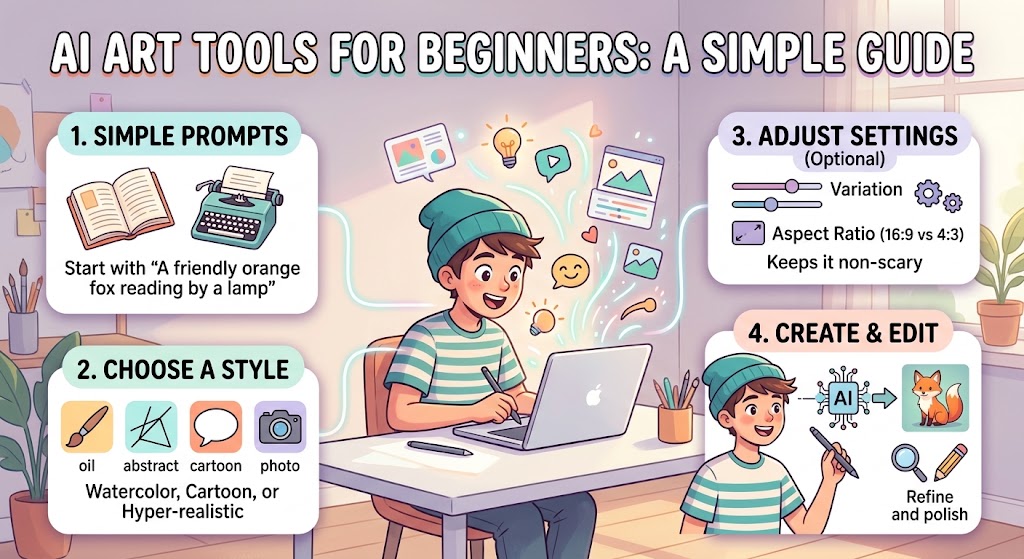
Artificial intelligence has changed the way people create digital artwork. You no longer need years of drawing experience to experiment with illustrations, characters, backgrounds, posters, and creative concepts. With the right AI art tools for beginners, a simple written idea can become an impressive visual in a short time.
AI art generators are becoming useful for students, content creators, bloggers, designers, marketers, and people who simply enjoy experimenting with creative ideas. The technology can help turn descriptions into images, modify existing artwork, remove backgrounds, create variations, and explore different visual styles.
For beginners, however, the number of available tools can feel confusing. Each platform has different features, interfaces, pricing models, and image generation methods. This guide explains what AI art tools do, how beginners can use them, and what to consider when selecting one.
What Are AI Art Tools?
AI art tools are software applications that use artificial intelligence to create or modify visual content.
Many modern tools allow users to type a description, often called a prompt, and generate an image based on that description. For example, a beginner could write:
“A small wooden cabin beside a peaceful lake surrounded by autumn trees.”
The AI system analyzes the description and produces an image representing the requested scene.
Other tools can work with an existing image. They may help change backgrounds, expand an image, edit objects, improve resolution, or produce different versions of a design.
This makes AI art software useful for both image creation and image editing.
Why Beginners Are Using AI Art Generators
Traditional digital artwork can require drawing skills, expensive software, and considerable practice. AI tools can reduce some of these barriers.
A beginner can start with an idea instead of a blank canvas. The user describes the desired image, reviews the result, and then changes the prompt if the result does not match the original idea.
This process can make creative experimentation easier.
AI art tools can also save time when someone needs simple visual material for a blog, presentation, social media post, concept board, or personal project.
However, AI should be viewed as a creative tool rather than a replacement for every design skill. Human editing, judgment, composition, and originality still matter.
Types of AI Art Tools
There is no single type of AI art software. Different platforms focus on different creative tasks.
Text to Image Generators
These are among the easiest tools for beginners. You provide a written description and the system creates an image.
They can be useful for:
- Illustrations
- Concept art
- Backgrounds
- Posters
- Characters
- Social media graphics
- Creative experiments
The quality of the result usually depends on the model, prompt, settings, and type of image requested.
AI Image Editors
AI editing tools allow users to change existing images. Instead of generating an entire picture from scratch, you can select part of an image and ask the software to modify it.
For example, an editor might help replace a background, remove an unwanted object, or extend the edges of an image.
AI Design Platforms
Some platforms combine image generation with traditional graphic design features. They can be useful for creating social media posts, presentations, advertisements, thumbnails, and other visual content.
These tools may be easier for beginners who want a complete design rather than a standalone AI generated image.
AI Upscaling Tools
Image upscaling software uses AI techniques to increase the apparent resolution and detail of an image.
This can be useful when working with a small image that needs to appear larger. Results vary depending on the original image and the software.
How to Choose an AI Art Tool
Beginners should avoid choosing a platform simply because it is popular. The right option depends on what you want to create.
Look at Ease of Use
A complicated interface can make learning frustrating. Beginners may prefer platforms with a straightforward prompt box, simple controls, and clear generation options.
Check Image Quality
Different AI models produce different results. Some may be particularly good at realistic scenes, while others may perform well with illustrations, graphic designs, or artistic concepts.
Try several sample generations before deciding which platform suits your needs.
Understand the Pricing
Some AI art platforms provide free generations, while others use credits, subscriptions, or paid plans.
Before subscribing, check what is included. A low monthly price does not necessarily mean unlimited generation.
Check Usage Rights
This is particularly important if you plan to use AI generated images for business purposes.
Read the platform’s current terms regarding commercial use, ownership, licensing, and restrictions. Policies can differ between services and may change over time.
What Is an AI Art Prompt?
A prompt is the instruction you provide to an AI image generator.
A weak prompt might be:
“A dog.”
A more detailed prompt could be:
“A golden retriever sitting beside a wooden cabin in a snowy mountain landscape, soft morning light, realistic photography, detailed fur, natural colors.”
The second prompt gives the system more information about the subject, environment, lighting, and visual approach.
You do not need to write complicated prompts as a beginner. Start with the main idea and gradually add useful details.
A Simple Prompt Formula
A practical prompt structure is:
Subject + environment + action + appearance + lighting + visual style
For example:
“A young explorer standing beside an ancient stone temple in a tropical forest, holding a lantern, warm evening light, detailed digital illustration.”
This structure gives the AI several useful pieces of information without making the prompt unnecessarily complicated.
Tips for Better AI Artwork
Getting good results usually requires experimentation. Your first generation may not look exactly like the image you imagined.
Be Specific
Instead of saying “a nice house,” describe the important details.
Mention the architecture, location, time of day, weather, materials, or atmosphere when those details matter.
Describe the Composition
You can tell the AI how you want the image arranged.
For example, you might request a close-up portrait, wide landscape, overhead view, or centered subject.
Experiment With Styles
Try different visual directions such as realistic photography, watercolor, digital illustration, 3D artwork, minimalist design, or cinematic imagery.
Keep in mind that specific style references can raise copyright or imitation concerns, especially when asking for an image that closely copies a living artist’s distinctive work.
Generate Variations
Do not expect the first result to be perfect. Generate several versions and compare them.
Small prompt changes can produce significantly different results.
Use Negative Instructions When Supported
Some AI platforms allow users to specify things they do not want in the image.
For example, you might request:
“No text, no watermark, no extra objects.”
The exact effect depends on the platform.
Common Beginner Mistakes
AI image generation looks simple, but beginners often make a few common mistakes.
One mistake is putting too many unrelated ideas into a single prompt. When the description becomes confusing, the generated image may also become inconsistent.
Another mistake is expecting perfect text inside an image. AI image models have improved considerably, but generated lettering can still contain mistakes depending on the tool.
It is also important not to assume that every AI generated image is automatically safe for commercial use. Always check the specific platform’s licensing terms before publishing an image commercially.
Can Beginners Make Money With AI Art?
AI art can support several creative businesses and content projects.
For example, creators may use AI generated visuals for social media content, blog illustrations, marketing concepts, digital products, thumbnails, or design projects.
However, generating an image alone does not guarantee that it can be sold or monetized. Commercial use depends on the tool’s license, the content involved, and the rules of the platform where the work is published.
Adding human creativity and editing can also make the final work more distinctive and useful.
AI Art and Human Creativity
One of the most interesting aspects of AI artwork is the relationship between technology and human creativity.
The AI does not know exactly what you are imagining. You provide the idea, make creative decisions, evaluate the results, and decide what should be changed.
A skilled user can therefore treat AI as a creative assistant.
Instead of asking the software to do everything, beginners can use it to explore possibilities and then refine the selected result using traditional editing tools.
Best Way to Start With AI Art
If you are completely new, start with simple projects.
Create a landscape. Then try a character. After that, experiment with a product scene, poster, or social media image.
Keep notes about prompts that produce useful results. Over time, you will learn which descriptions work well for the type of artwork you want.
There is no need to master every setting immediately. Learning the basics of prompting, image composition, editing, and licensing will give you a strong foundation.
Final Thoughts
AI art tools for beginners have made digital image creation more accessible. A person with little or no artistic experience can describe an idea and use AI to explore a wide range of visual possibilities.
The best results usually come from experimentation rather than a single perfect prompt. Start with a clear concept, add useful details, generate multiple versions, and improve the strongest result.
Most importantly, understand the usage rights of the tool you choose, especially if you plan to use the artwork commercially.
AI can make image creation faster and more accessible, but human creativity remains an important part of the process. When technology and thoughtful creative decisions are combined, beginners can produce artwork that is useful, distinctive, and suited to many different projects.
About The Author

 David
David